


Lighting Controllers article
The Complete Guide to Lighting Controllers
Lighting controllers let you synchronise stage lights with music in real time. Learn how they work, what features matter, and how to operate them effectively.
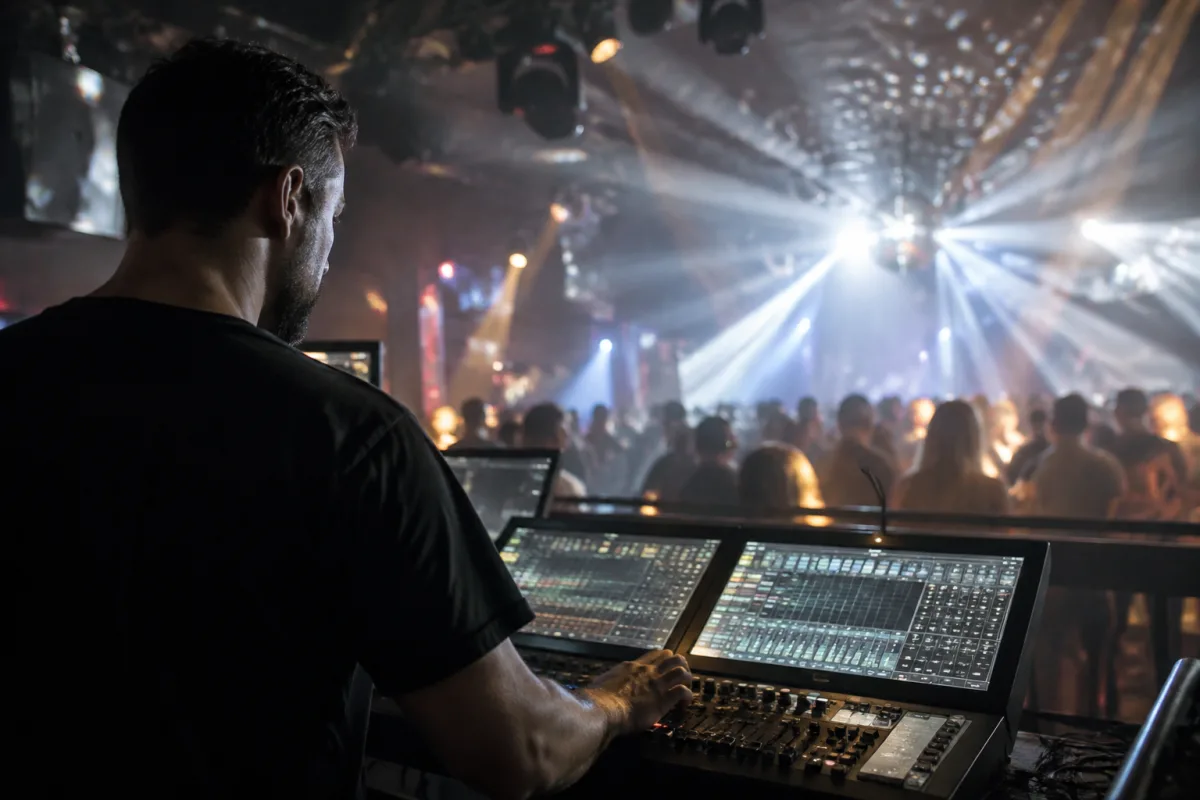
Lighting controllers have become essential tools for DJs, live performers and event producers. Whether you're spinning at a club, running a small live show, or managing a concert venue, lighting controllers let you synchronise lights with the music, creating an integrated audiovisual experience that transforms how your audience experiences the event. A good lighting controller gives you real-time, hands-on control over colours, intensity, patterns and effects – turning your stage from static to dynamic.
For anyone new to stage lighting, the core idea behind lighting controllers is straightforward: they take commands from your hands – button presses, fader moves, paddle sweeps – and translate those into light changes. Instead of pre-programmed sequences that run on their own, you're actively shaping the visual component of your performance, responding to the music and the crowd just as you would with your DJ equipment or instruments.
Types of Lighting Controllers
Lighting controllers come in several physical formats. A small desk or control surface features buttons, faders and encoders arranged logically for quick operation. A handheld remote or wireless controller lets you move around the stage whilst controlling lights. A software-based controller on a laptop gives you a large visual interface and extensive programmability, though it ties you to a computer. Many setups combine multiple types – a hardware desk as the primary controller and a wireless remote for stage movement.
The choice depends on your venue and performance style. A DJ managing a small nightclub usually operates from a booth with a hardware controller. A live band performing across multiple venues might prefer a compact, portable controller. A festival or theatre production often uses a larger console with multiple operators.
Key Functions and Features
Most lighting controllers include these essential capabilities:
- Channel Control: Direct control over individual light fixtures – you can select a fixture and adjust its colour, brightness and effects independently or in groups.
- Faders: Smooth, continuous control over intensity or colour transitions, essential for creating flowing visual effects that match the music's dynamics.
- Buttons and Presets: Quick-select buttons for launching pre-programmed scenes or chases – complex light sequences stored in memory for instant playback.
- Colour Selection: RGB mixing, colour wheels or colour banks letting you dial in any colour quickly and reliably.
- Effect Programming: Tools for creating custom chases, strobes, fades and patterns that repeat or sync to music.
- DMX Output: A standard digital interface that connects to your lighting fixtures, allowing the controller to command dozens or even hundreds of lights.
- Audio Input: Many controllers let you connect your audio mixer or DJ equipment so the lights can respond to music intensity or beat detection.
How Lighting Controllers Connect to Your Rig
Lighting controllers use the DMX protocol – a digital standard that lets controllers talk to lighting fixtures. You connect your controller to your fixtures via a DMX cable, which carries all the commands from your controller to the lights. A single DMX line can control up to 512 individual light channels, meaning you can manage a comprehensive rig with just one cable run from controller to lights.
Many modern controllers also support wireless DMX, eliminating cable runs and giving you mobility on stage. Some also integrate with your audio equipment – they can detect musical tempo or beat and automatically sync light effects to the rhythm, creating seamless synchronisation without you actively programming every transition.
Setting Up Lighting Controllers for Different Venues
Each venue is unique, so a versatile lighting controller needs to adapt. Many controllers let you save multiple preset configurations or scenes – your "ambient" setup for spoken word, your "high-energy" chase sequences for peak dancing, your "strobes and effects" preset for high-intensity moments. Switching between presets takes a single button press, so you can adapt to crowd energy without stopping.
Experienced operators often pre-programme their lighting sequences during soundcheck. They know the track list, they know the venue's fixtures, and they've planned the visual arc of the event. When the performance starts, they're executing those plans, responding in real time with additional lighting flourishes and reactions to crowd energy.
Wireless and Portable Controllers
Wireless lighting controllers have become increasingly popular because they free you from being tethered to a console. A compact wireless remote in your hand lets you move around the stage, control lights from anywhere in the venue, and respond to the energy on the floor rather than from a fixed booth. This is particularly useful for live performers or DJs who like to interact with their audience.
Battery life and wireless range are important considerations with portable controllers. Quality wireless units operate at distances up to 100 metres with solid signal, and batteries typically last 8-12 hours – ample for most events. Some models are rechargeable via USB, simplifying power management on the road.
Integration with DJ Equipment and Live Rigs
Modern live performances increasingly treat lights as a primary instrument alongside audio. Many DJ controllers and live performance interfaces now include DMX output, letting you control lights directly from your main console without needing a separate lighting controller. This integration is powerful – some systems let you map lighting effects to your audio tracks so lights respond to specific musical moments automatically.
For live bands, lighting controllers integrate into the overall performance setup alongside amplifiers, monitors and effects. Dedicated lighting operators manage the visuals, responding to the music and cues from performers, creating a cohesive performance experience where audio and visuals work in harmony.
Learning to Operate Lighting Controllers
Operating a lighting controller effectively takes practice and understanding of your specific equipment. Most manufacturers provide thorough documentation and tutorial videos. Many music venues and event production companies offer operator training. The core skills – understanding DMX, creating scenes and chases, responding to music, managing multiple fixtures – are learnable and become intuitive with regular use.
Start simple: control a few fixtures, learn to fade colours smoothly, get comfortable with your button layout and fader movements. As confidence grows, layer in more complex chases, experiment with strobes and effects, and develop your personal style. Many operators develop signature visual aesthetics – distinctive lighting choices that become part of their performance identity.
A lighting controller transforms a performance from audio-only into a full sensory experience. Whether you're controlling a small venue, a nightclub, or a festival stage, understanding how to use a lighting controller effectively elevates your production quality and creates memories that extend beyond the music.


Comments