


Nord Grand article
Nord Grand for Beginners: A Complete Guide
The Nord Grand is powerful but not complicated for beginners. This guide walks you through your first session, essential controls, and the mistakes to avoid.
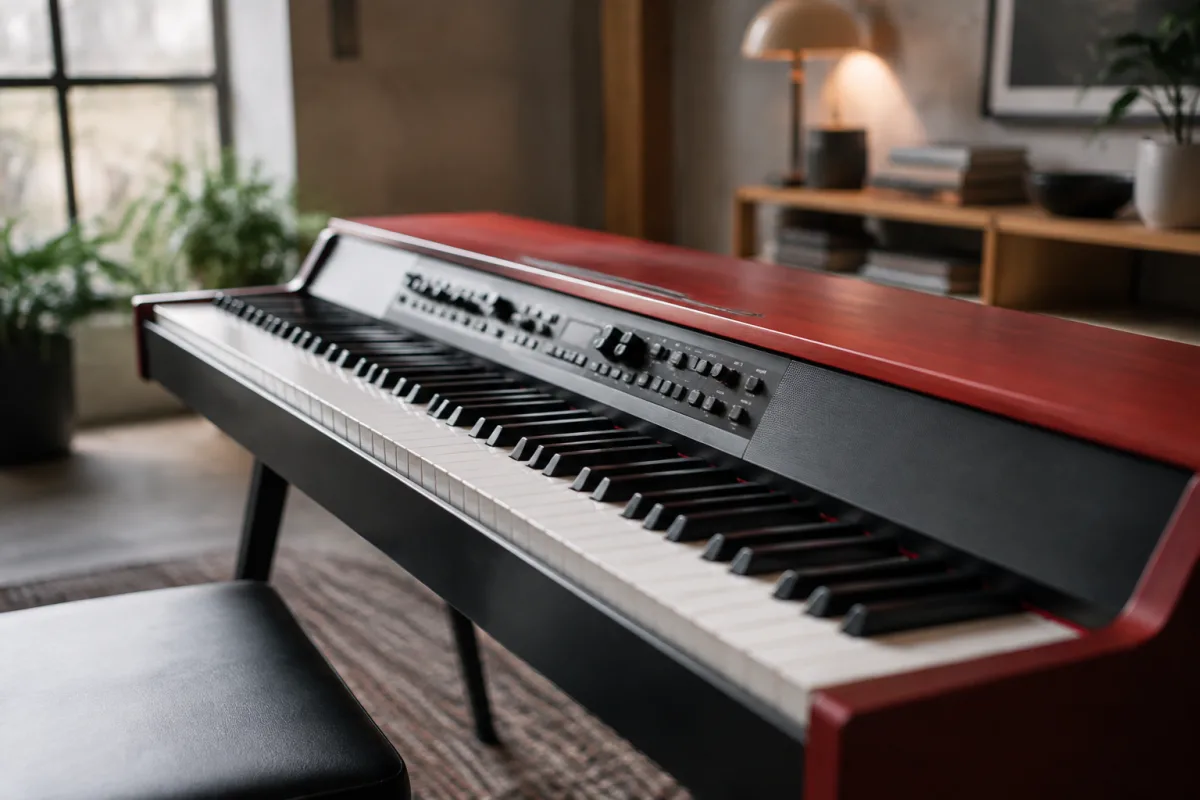
The Nord Grand is a beautiful, powerful stage piano—and if you've just bought one or are considering it, you might feel slightly overwhelmed by all the controls and possibilities. Don't. The Nord Grand is genuinely beginner-friendly once you understand the basics. This guide walks you through your first session, common mistakes first-timers make, and how to unlock the sounds you're looking for without getting lost in the deep menus.
What You Have: A Very Quick Overview
The Nord Grand is Nord's premium stage piano with a weighted wooden keyboard (88 keys), built-in speakers, and an enormous sound engine covering acoustic pianos, electric pianos, strings, pads, and synths. It sits somewhere between a traditional piano and a modern synthesizer—accessible as a piano, but powerful enough to grow into for years. The good news: everything is accessible from the front panel. You don't need to dive into menus to get beautiful sounds.
Your First 15 Minutes: The Essentials
Power On and Volume
Press the power button on the rear. Wait for the screen to boot. Before you do anything else, find the Master Volume knob on the left side of the control panel and set it to a comfortable level—around 10 o'clock for practice, louder if you're playing to an audience.
Load a Program (Sound Preset)
The Nord Grand ships with hundreds of sounds called "Programs." On the front panel, you'll see buttons labelled with categories: "Piano," "Electric," "Strings," etc. Press "Piano." You'll see a list of preset piano sounds. Use the arrow buttons to scroll through them. Pick "Grand Piano 1" or "Concert Grand." Press the button to load it.
Play
Connect your headphones to the headphone jack (rear panel), or use the built-in speakers if you're in a suitable room. Play a few notes. The sound should respond immediately to your touch. Congratulations—you're using a Nord Grand.
Understanding the Three Sections
The Nord Grand has three main sound layers:
Piano (Left Section of Controls)
This is the traditional piano sound engine. It covers acoustic grand pianos, upright pianos, and electric pianos. Each sound has controls like "Tone" (brightness), "Lid" (how far open the piano lid is, affecting projection), and sometimes "Pedal Noise" (the mechanical sound of the pedals). Don't touch these until you're comfortable; the defaults sound great.
Synth (Right Section of Controls)
This is a synthesizer engine layered underneath. It adds pad, string, or synth sounds to your piano. Beginners often don't touch the synth section at all—and that's fine. It's there if you want to add texture later.
Master Effects (Centre Controls)
Reverb and delay. These add space and ambience to your sound. The Reverb is usually already set to a nice hall or room—leave it alone to start. The Delay is off by default; you don't need it yet.
First-Timer Mistakes and How to Avoid Them
- Diving into the menu system too early: The Nord Grand has deep editing menus, but you don't need them to make beautiful music. Stick to the front panel controls and the preset sounds for your first month.
- Turning knobs randomly to "explore": It's tempting, but turning the Tone knob all the way up makes the piano sound shrill, and buried parameters change how the whole instrument behaves. Read the manual (or watch a quick YouTube tutorial) before tweaking controls.
- Forgetting to save your settings: If you adjust something you love—like adding a bit of synth to your piano—remember to save it as a new program. Otherwise, the next time you switch sounds, your changes are gone. Press "Program" → "Save As" to create a new preset.
- Ignoring the pedals: The Nord Grand has three pedals (sustain, soft, sostenuto, like a traditional piano). Use them! They're not decorative—they fundamentally change how the piano responds. Sustain especially is crucial to expressive playing.
- Assuming all grand pianos sound the same: They don't. Load "Grand Piano 1" and then "Grand Piano 2." Both beautiful, but different. Spend time with different pianos to find the one that speaks to you.
- Not adjusting the built-in speakers: The Nord has built-in speakers, but they're quiet for privacy during practice. Use headphones for most practice, and only crank the speakers when you're sure about your neighbours.
Navigating the Sounds: A Beginner Map
The Nord Grand organizes sounds by category. Here's what you'll find:
Piano: Acoustic grands, uprights, upright-pianos with a bit of electric warmth. Start here if you want classic, straightforward piano sounds.
Electric: Fender Rhodes, Wurlitzer, Hohner Clavinet. If you want that 1970s warmth or a bright, clicky electric piano, this is your section.
Strings: Orchestral strings, pads, and textures. Great if you're layering strings under your piano playing or want a sweeping pad sound.
Synth: Pure synthesizer programs—bells, pads, keys, effects. These are often wild and colourful. Good for experimentation once you're confident.
Spend your first few sessions loading sounds from each category and listening. You'll quickly develop a sense of what's where.
The Sustain Pedal Is Your Best Friend
If you're new to weighted keyboards, the sustain pedal on the Nord Grand (rightmost of the three pedals) will transform your playing. Press it down and the notes ring on indefinitely (or until you release it). This is how pianists add expression and flow. Experiment with half-pedalling (pressing it partway down for a subtle effect). The more you use it, the more expressive your playing becomes.
When You're Ready: Next Steps
Once you've spent a week with the preset sounds, you can start experimenting:
- Try layering the piano with a subtle string or pad sound (use the Synth section).
- Adjust the Reverb if you want more or less space in your sound.
- Save a program when you find a combination you love.
- Explore the electric pianos—they open up a completely different sonic world.
- If you get curious, watch Nord's official tutorials on deeper editing. But you're not missing anything by skipping this at first.
The Bottom Line
The Nord Grand is powerful, but it's not complicated for beginners. Load a preset, play, and enjoy. The deeper editing, synth layers, and menu diving can wait weeks or months. You're not missing out by keeping things simple—you're learning the instrument the right way, at your own pace. Play daily, experiment with different sounds, and let yourself fall in love with how it feels under your hands.
For a deeper technical dive into the Nord Grand, read our guide: The Complete Guide to Nord Grand.



Comments