


Waveform article
Waveform Explained: Features, Types and Tips
Waveform is a digital audio workstation by Tracktion—affordable, straightforward, and powerful enough for serious home recording and electronic music production.
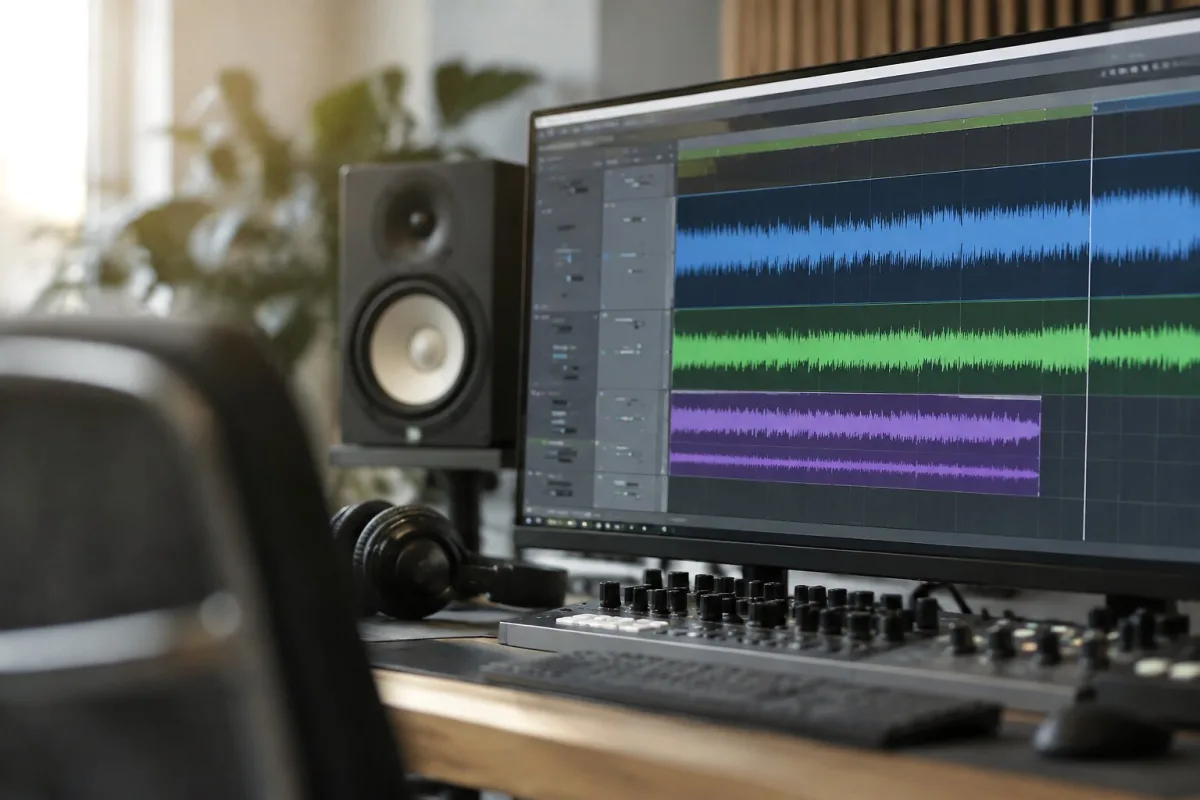
Waveform is a DAW—a digital audio workstation—built by Tracktion. If you're making music at home, laying down beats, recording vocals, or mucking about with electronic instruments, Waveform is one of the tools that lets you do all that without spending a fortune or learning an entire operating system just to record a guitar riff. It's straightforward to use, flexible enough for serious work, and cheap enough that you're not taking a massive financial gamble on something you might abandon next month. This guide explains what Waveform actually is, what it does, and whether it's the right tool for what you're trying to make.
What is Waveform?
Waveform is a digital audio workstation made by Tracktion, a UK-based audio software company. Think of it as a virtual recording studio—a program where you can record audio, arrange it into tracks, add effects, mix things, and eventually export a finished song. You can record vocals and guitars through an audio interface. You can load virtual instruments and play synths or drums from your keyboard. You can edit audio waveforms visually, layer things on top of each other, and automate changes over time.
Waveform comes with a decent library of built-in instruments and effects. There's a sampler, a synth, reverb, compression, EQ, delay—the essentials for making finished tracks. You can load VST and AU plugins if you want extra tools. You can work with MIDI to program drums or melodies. The workflow is logical: you're never more than two or three clicks away from doing what you want to do.
What sets Waveform apart from free alternatives like Audacity is that it's built for music production, not just audio editing. What sets it apart from expensive DAWs like Pro Tools or Logic is the price. A perpetual license costs around £35–60, depending on promotions. That's it. No subscription, no rental, no "you'll own it until Tracktion changes their mind."
Different Versions and Editions
Tracktion offers a few different Waveform editions. There's a free version with limited functionality—you get four tracks, no plugin support, and no MIDI editing. It's genuinely enough for someone to try recording a simple vocal or guitar idea, but you'll hit the limits fast.
The standard paid version (often called Waveform Pro) removes the track limit, adds full plugin support, MIDI editing, video scoring, and a bunch of other features. That's the one most people buy. It's a one-time purchase, usually £35–60. Updates are free—Tracktion regularly releases new versions and improvements without charging extra.
Occasionally Tracktion releases special editions bundled with certain hardware or partnerships, but the core product hasn't changed much: a no-nonsense DAW built for people who want to make music without all the corporate overhead.
The Waveform Workflow: What You Actually Do
You open Waveform. You start a new project. You can create a new track for recording audio, or load an instrument plugin if you want to play something in. You hit record and capture audio, or you play and program MIDI. Once you've got material down, you arrange it—maybe copy a chorus section, stack layers, build the song structure. You add effects to individual tracks or the whole mix. You automate parameter changes so a filter opens up on the chorus or the reverb swells during a breakdown. You mix levels so everything sits together. You export a finished MP3 or WAV file.
None of this is hidden behind menus or obscure shortcuts. Waveform's interface is direct: tracks are visual, clips are visible, controls are where you'd expect them. If you've ever used any other DAW, you'll find your way around Waveform in an afternoon. If this is your first DAW, Waveform is about as friendly as DAWs get.
What Waveform Is Good At
Home recording on a budget
A cheap audio interface, Waveform, and a microphone is all you need to record vocals and instruments. The low entry price means you can actually afford to try it without betting your rent.
Electronic music and beats
The built-in sampler and synth are solid. Plugin support means you can add third-party instruments if you want them. MIDI editing is straightforward. For beats and electronic music, Waveform has everything you need.
Mixing and mastering
Waveform has proper mixing tools: faders, panning, automation, metering. The built-in EQ, compressor, and other effects are usable. You won't master a radio hit in Waveform, but you can make a track sound coherent and polished enough to put online.
Quick ideas and sketches
The simplicity of Waveform means you can capture an idea, throw some reverb on it, and have a rough mix in twenty minutes. It doesn't get in your way when you just want to play around.
Where Waveform Has Limits
Waveform is missing some features that exist in much more expensive DAWs. There's no native video playback, so if you're composing for film you'll need workarounds. The piano roll (MIDI editor) is functional but basic compared to something like Ableton Live. The browser for finding sounds could be more sophisticated. The built-in instruments are decent, not spectacular—you'll probably want to add third-party plugins eventually.
Waveform is not optimised for working with huge session files. If you're tracking a twenty-piece orchestra, Pro Tools has more robust infrastructure. But if you're recording a band or making electronic music, Waveform handles the typical workload fine.
Who Should Choose Waveform?
You should choose Waveform if you're making music at home on a tight budget. If you want a DAW that gets out of the way so you can focus on the music, not the software. If you're making electronic music, beats, or recording vocals and guitar at home. If you hate subscriptions and want to own what you're using.
You might want to look elsewhere if you're a professional mixer expecting deep automation and mixing sophistication, if you need native video sync, or if you're recording a full rock band with twenty-four tracks. Waveform can do all these things, but other DAWs have more mature tools for those workflows.
FAQ
- Is Waveform better than Audacity?
- Audacity is free audio editing software. Waveform is a full DAW. Audacity is better for editing finished recordings; Waveform is better for recording and producing music. They're different tools for different jobs. If you're recording and making music, Waveform wins. If you're just trimming or cleaning up an existing audio file, Audacity is fine.
- How does Waveform compare to Logic Pro?
- Logic Pro costs £200 and comes with an enormous library of virtual instruments and effects. Waveform costs £35–60 and includes the essentials. Both are excellent DAWs. Logic has more features; Waveform has less complexity. For home recording and electronic music, Waveform punches above its price.
- Can you use Waveform for podcast editing?
- Technically yes, but Waveform is overkill for podcasts. Audacity or GarageBand is more appropriate. Waveform is built for music production, not podcast editing.
- Do you need a separate audio interface with Waveform?
- If you're just recording guitar or vocals, yes. If you're only making music with software instruments and you're okay with your computer's built-in audio, no. But a cheap audio interface (£50–100) genuinely improves recording quality.
- Is Waveform good for learning music production?
- Yes. The straightforward interface means you're not spending time fighting the software—you're learning mixing and arrangement. Many production tutorials use other DAWs, but the concepts transfer directly to Waveform.
- Can you use third-party plugins in Waveform?
- Yes, Waveform supports VST and AU plugins. You can load any compatible plugin into Waveform and use it. The paid version has no plugin limit.
- How is Waveform's CPU usage?
- Waveform is efficient and lightweight compared to other DAWs. It runs fine on modest hardware. If your computer is older or has limited RAM, Waveform is a good choice.
- Will Waveform import audio files from other DAWs?
- Yes. Waveform imports WAV, MP3, AIFF, and other common audio formats. It also imports MIDI files. You can open projects from other DAWs and work with their audio and MIDI in Waveform.





Comments