


Music Software Reason article
Music Software Reason for Beginners: A Complete Guide
Intimidated by Reason's interface? This beginner's guide demystifies the visual rack approach and walks you through creating your first track, proving you can make music with Reason in just hours.
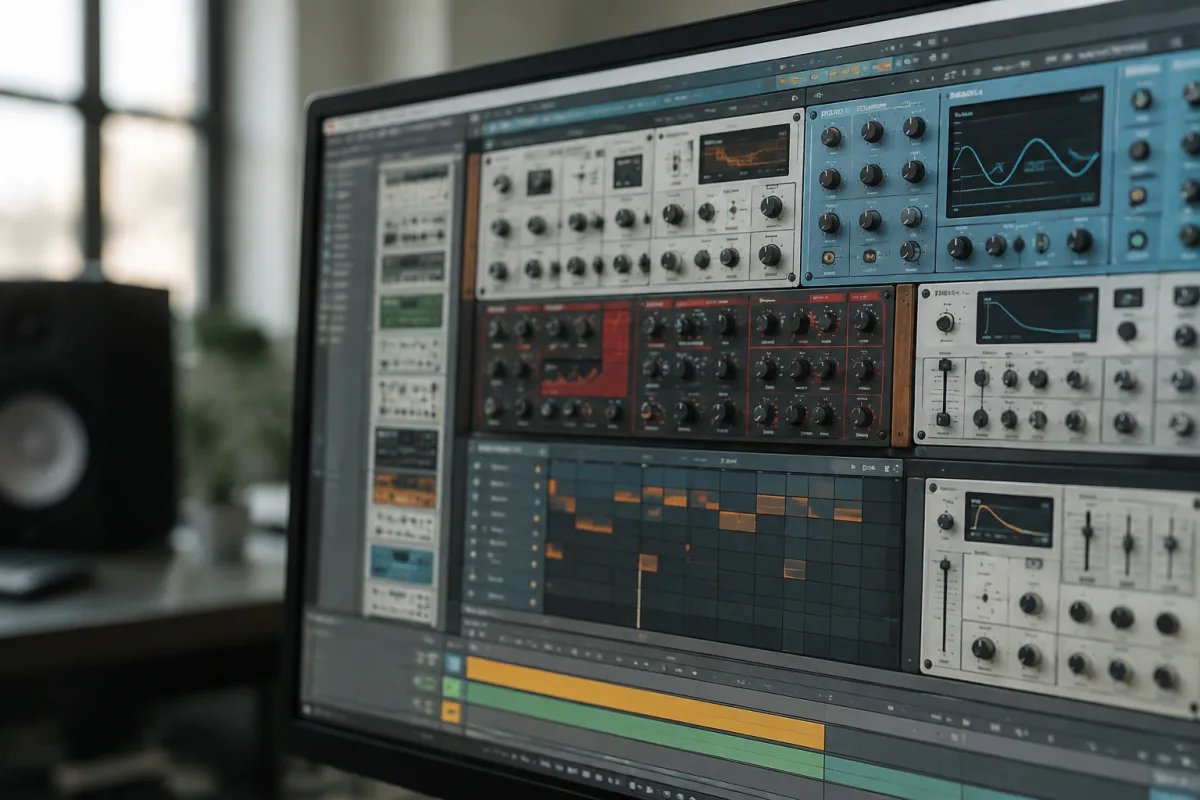
Reason is one of the most beginner-friendly music production environments available, yet its visual complexity and distinctive rack-based approach can feel overwhelming on first launch. If you're considering Reason music software as your entry into digital music production, you're making an excellent choice—but knowing where to start will make your learning journey significantly less frustrating. This guide strips away the intimidation and shows you exactly what to do during your first sessions with Reason music software, helping you move from confused to creating within hours.
Why Beginners Love Reason Music Software
Reason stands apart from other DAWs because of its visual, hands-on approach to music creation. Rather than hunting through abstract menus and cryptic parameters, Reason music software presents synthesisers, samplers, and effects as virtual rack equipment you interact with visually. This tactile, visual approach resonates with beginners because it mirrors real music production hardware—you can see exactly what you're doing rather than relying on text-based settings.
The learning curve is gentler than many alternatives. Reason music software includes excellent built-in tutorials and a manageable set of core concepts. Unlike some production software that can feel endlessly complex, Reason focuses you on essentials without overwhelming you with obscure options. This makes it ideal for producers who want to start making music quickly rather than spending months learning software mechanics.
Installation and Your First Launch
Download Reason music software from the official site and follow the installation prompts. Once installed, launch the application—your first view will be a blank project with an empty rack. Don't panic at the emptiness; this is your canvas. Reason music software uses the "rack" metaphor: your instruments and effects are virtual hardware units stacked in a rack, exactly like professional studios stack physical equipment.
Before diving into creating, spend 10 minutes exploring the interface without judgment. Click on menus, look at the button layout, read tooltips by hovering over elements. Reason music software is visually consistent and well-designed; you'll quickly develop spatial memory for where things are. This gentle exploration beats jumping directly into your first track and feeling lost.
Setting Up Your First Instrument
Begin by creating a simple instrument rack. In the Reason music software menu, select "Create" and choose "Synth Rack" or browse available instruments. Start with a basic synth like the Synth, which is included with Reason music software and offers straightforward controls. Your new instrument appears in the rack at the bottom of your screen.
Above the instrument rack is the sequencer track—this is where you arrange your notes over time. Click on a track's piano roll (the grid area) and start drawing notes. In Reason music software, this is intuitive; you simply click where you want notes to appear and drag to set their length. Play back your track using the transport controls at the top. You've just created your first melody in Reason music software. That first loop, however simple, proves you can make something tangible immediately.
Understanding the Rack and Signal Flow
The rack in Reason music software follows a logical chain: instruments produce sound, effects process that sound, and a master output delivers the final result to your speakers. Early on, don't overthink this. Create an instrument, add a track, play notes—that's the complete workflow. As you grow comfortable, you'll explore adding effects (reverb, delay, filters) which sit between your instrument and the output.
One of Reason music software's best features is the ability to "flip" the rack to its back side. This shows the cable connections between devices in a visual, intuitive way. Beginners often find this "back panel" view clarifying rather than intimidating; you can see exactly how signal flows from one device to another. Don't shy away from exploring it—understanding signal flow builds your mental model of how music software works.
Presets: Your Friend and Teacher
Reason music software includes extensive preset libraries for each instrument. When you create a synth, it loads with a default sound, but hundreds of presets are available by clicking the preset selector. Don't feel like you're "cheating" by using presets; even professional producers start from presets and customize them. For beginners, presets teach you what's possible and let you focus on arrangement and composition rather than sound design.
Spend time browsing presets and listening to what different instruments sound like. Use presets that excite you, even if they're not "conventional." Reason music software music is full of unusual, experimental timbres. Finding a preset you love is half the battle; arrange it into a compelling pattern and you've created something unique.
Your First Complete Track: The Roadmap
Here's a practical workflow for your first Reason music software track: Create a drum sequencer and program a simple beat (kick on beats 1 and 3, snare on 2 and 4). Add a bass synth playing a simple repeated pattern. Create a melodic synth that plays occasional phrases above the bass. Add a pad synth that sustains underneath. Arrange these four elements over 8 bars, varying them slightly (mute certain elements in bars 5-8, add a fill in the snare). You've created a structured arrangement.
This simple framework prevents the "blank page panic" many beginners experience. You're not trying to create something extraordinary; you're applying a proven structure that works. Your first track won't sound professional, but it will sound like music. That achievement is motivating and teaches you how arrangement works.
Common First-Timer Mistakes to Avoid
Beginners often try to understand everything about Reason music software before creating anything. You'll make faster progress by creating, experimenting, and learning through doing. Don't read the entire manual before opening your first project; jump in, fail, learn from failure, then read documentation when you're stuck.
Another common mistake is avoiding effects because they seem complex. Effects in Reason music software are intuitive; drag them onto your rack, and experiment with their controls. You'll quickly develop intuition for how reverb, delay, and filtering change your sound. Early experimentation is how you develop ears for production.
Don't neglect the included tutorials in Reason music software. They're genuinely excellent and cover exactly what beginners need. Following a tutorial creates a guided, confidence-building experience. You can customize examples afterward once you understand the basics.
Navigating Reason Music Software's Learning Path
After completing your first track, export it as an MP3 file and listen on different speakers and headphones. You'll immediately hear things you'd improve. That critical listening is how you develop production skill. Rather than making a second track in Reason music software, refine your first one. Add effects, adjust levels, change arrangements. Iteration teaches more than starting from scratch repeatedly.
Join online communities of Reason music software users. The community is welcoming and knowledgeable. Ask questions without worrying about sounding inexperienced; everyone there was a beginner once. Sharing your early Reason music software tracks gets you feedback that accelerates your learning.
For comprehensive exploration of Reason music software, its capabilities, and advanced techniques, see the complete guide to music software reason, which covers the full range of features, workflow optimisation, and creative possibilities.
Your Next Session
Close this guide and open Reason music software. Create an instrument, play some notes, add another instrument, and arrange them into a simple pattern. Spend 30 minutes just experiencing the software without judgment. That hands-on exploration matters infinitely more than reading about how to use Reason music software. You'll discover how intuitive it actually is, and you'll have something tangible—your first Reason composition—to show for your effort.


Comments