


Foley Samples article
Foley Samples for Beginners: A Complete Guide
Foley samples—recordings of everyday sounds—transform bare soundtracks into immersive experiences. This beginner's guide walks you through finding, timing, and using foley to bring your projects to life.
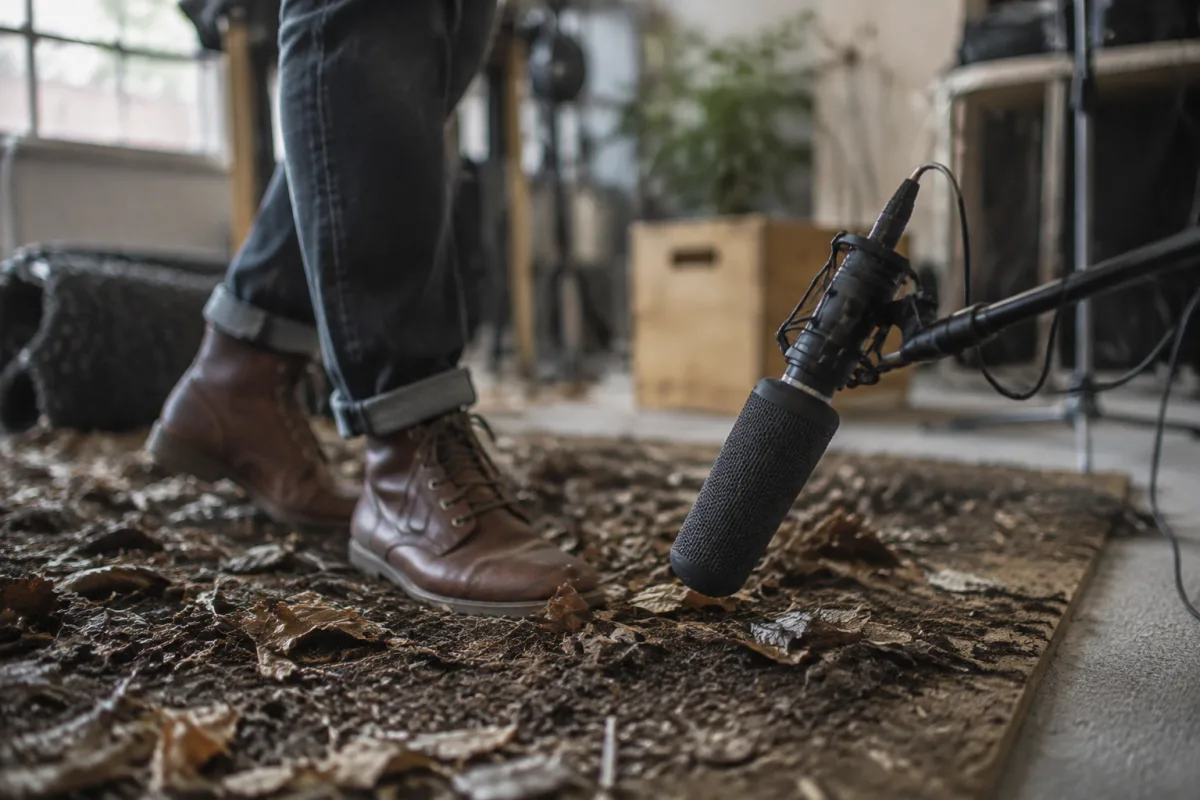
If you're creating soundtracks for videos, games, podcasts, or films, you've likely wondered how those realistic sound effects—footsteps, door slams, rustling fabric—get into the final mix. The answer is foley samples: pre-recorded sounds of everyday objects and movements, packaged as files you can drop into your project. For beginners, understanding and using foley samples transforms production from feeling bare to feeling complete. This guide walks you through the fundamentals and practical techniques.
What Foley Actually Is
Foley refers to sound effects that represent everyday actions: footsteps, fabric rustling, door creaks, dishes clinking, grass crunching. Traditionally, foley artists recorded these sounds live during post-production sessions, performing actions in sync with video. Today, most beginners use pre-recorded foley sample libraries instead.
The result is the same: your soundtrack sounds real rather than sterile. A video scene with footsteps, door opening, and background ambience feels immersive; the same scene without foley sounds incomplete.
Why Beginners Should Use Foley Samples
Three reasons foley is essential for new sound designers:
Reason 1: It's immediately noticeable. Adding foley to a scene changes everything. Viewers feel the difference instantly, even subconsciously. This immediate feedback builds confidence.
Reason 2: Good samples exist affordably. Vast foley libraries are available free or cheap. You don't need to record anything yourself. Just download, organize, and use.
Reason 3: It teaches timing and editing. Placing foley samples in sync with video action teaches you audio timing and synchronisation—skills that elevate everything you create.
Common Types of Foley Samples
Understanding categories helps you find what you need quickly:
- Footsteps: Shoes on different surfaces—wood, concrete, carpet, gravel, grass. Most sound effects libraries dedicate entire folders to footsteps.
- Impact sounds: Objects hitting surfaces—doors slamming, items dropped, collisions. Essential for any action or movement.
- Fabric and clothing: Rustling, fabric movement, zippers, clothing adjustments. Creates believable motion even offscreen.
- Ambience: Room tone, background hum, weather sounds. Creates space and realism.
- Handling sounds: Picking up objects, setting them down, manipulation. Brings objects to life.
That's genuinely all you need to know initially. Most scenes use just a few of these categories.
Finding Foley Samples: Where to Start
Multiple sources exist for finding quality foley samples:
Free libraries: Freesound.org, Zapsplat, BBC Sound Library. Quality varies, but you'll find usable samples.
Affordable subscriptions: Epidemic Sound, Artlist, and similar services offer unlimited downloads for monthly fees. Excellent value for regular creators.
Professional libraries: Soundly, Foley Sherlock, and boutique libraries offer premium samples. Worth the investment once you've committed to sound design.
As a beginner, start free or with a trial subscription. You don't need expensive libraries to learn. Most sample libraries offer search functions, allowing you to filter by object type, surface, or action. Use these tools liberally.
Your First Foley Project: A Simple Workflow
Create your first foley sound design project this way:
- Find a short video clip (30 seconds) with clear action—someone walking, picking up an object, closing a door
- Import the video into your audio editor or DAW
- Identify the sounds you hear in the video (footsteps, door closure, ambient room tone)
- Search one foley library for footsteps matching the surface you see
- Download a few options and test them in your timeline, syncing with the video
- Repeat for other sounds until the scene feels complete
That's enough for day one. You've successfully used foley samples. Everything else builds from this foundation.
Practical Tips for Beginner Foley Work
These techniques will improve your results significantly:
Layer sounds for realism. Real actions create multiple sounds simultaneously. A footstep has impact, fabric rustle, and potentially floor creaking. Layer two or three samples to create complexity.
Use silence intentionally. Not every moment needs foley. Sometimes quiet amplifies impact. Leave pauses between actions rather than filling every space.
Match the visual timing exactly. If you see feet hit the ground, the footstep sound should align precisely. Sync issues jump out immediately and break immersion.
Vary samples within a sequence. If someone walks across a room taking five steps, don't use the exact same footstep five times. Vary the sample slightly or pitch-shift it. Real actions vary naturally.
Pay attention to perspective. Distant actions need quieter, further-away foley. Close-up actions need detailed, present-sounding samples. Match sample perspective to visual perspective.
Common Beginner Mistakes With Foley
Learning from others' errors saves frustration:
- Overusing foley. More sound effects don't make projects better. Selective use sounds professional; filling every moment sounds cluttered.
- Ignoring sample quality. Low-resolution or distorted foley breaks immersion. Invest time finding clean, well-recorded samples.
- Poor sync timing. If foley doesn't match visual action, it feels wrong immediately. Sync precision matters enormously.
- Forgetting volume levels. Foley that's too loud overwhelms other audio. Foley that's too quiet disappears. Proper level balance is essential.
- Using outdated sample packs. Old foley samples have recognisable character that audience members notice. Newer sample packs sound fresher.
When Foley Becomes Important
Foley is essential in these situations:
- Creating video content (YouTube, TikTok, professional films)
- Scoring games and interactive media
- Producing podcasts or audio drama
- Editing video that needs sound design beyond dialogue and music
Building Foley Confidence
Apply foley to three short video clips this week. Each should be under one minute. You'll quickly develop intuition for which sounds enhance scenes and which feel unnecessary. That instinct is genuinely all the experience you need to advance.
For more comprehensive foley techniques and advanced sound design, see the complete foley samples guide.
Your Next Step
Find one short video clip with an obvious action (door opening, footsteps, object being placed). Search "footsteps" in a free foley library. Download three options. Drop them into your timeline synced with the video action. Listen. That's your first foley experience. Start today.


Comments