


Headphone Converter Jack article
The Ultimate Guide to Audio Jack to Headphone Converter
When your headphones won't connect to your audio equipment, a quality headphone converter jack becomes essential. Understand the types, connector compatibility, and build quality that make the difference.
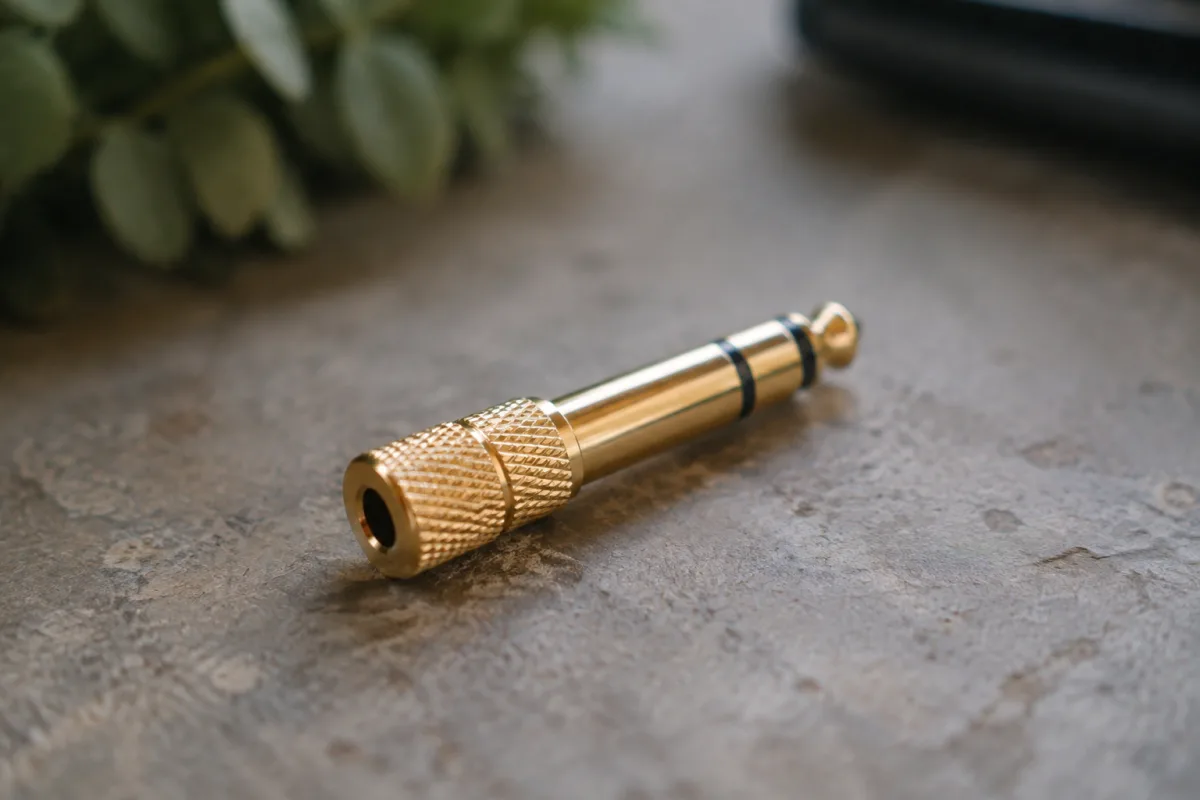
When your headphones won't connect to your audio equipment, or your legacy audio jack won't mate with modern devices, a headphone converter jack becomes essential. These simple but invaluable adapters bridge the gap between incompatible connectors, giving you years more life from equipment you already own. Whether you're dealing with vintage studio gear, professional audio interfaces, or struggling to use your favourite headphones with older hardware, understanding these adapters—and choosing the right one—can save you both money and frustration.
What Is a Headphone Converter Jack?
A headphone converter jack is an adapter that translates one type of audio connector into another. The most common scenario involves converting a standard quarter-inch (6.35 mm) jack—the industry standard for professional audio—into a 3.5 mm mini-jack that modern headphones use. Some work in reverse, adapting 3.5 mm connectors to fit vintage quarter-inch sockets. Others handle specialist formats like XLR or TS to TRS conversions, each serving a specific purpose in audio chains ranging from home studios to touring rigs.
These adapters sit at the intersection of legacy equipment and contemporary devices. Studio monitors, mixing consoles, and professional audio interfaces often use quarter-inch connectors as their standard output. Personal computers, tablets, phones and modern interfaces increasingly favour the 3.5 mm connector (or eliminate it entirely in favour of USB-C or wireless). A quality adapter lets these two worlds communicate without compromise.
Balanced vs Unbalanced: Which Adapter Do You Need?
This is where things get technically interesting. Professional audio uses balanced connections—three wires: tip, ring, and sleeve (TRS). Consumer audio uses unbalanced connections—two wires: tip and sleeve (TS). A quarter-inch TRS jack carries a balanced mono signal or stereo audio. A 3.5 mm stereo jack is always unbalanced.
An unbalanced headphone converter jack adapting quarter-inch to 3.5 mm simply maps the tip and sleeve pins across. This works fine for headphones, which operate at line level (typically −6 dBu to +4 dBu in professional contexts). A balanced adapter is unnecessary for headphone use—headphones are passive devices and don't care about balance; they only care that they receive audio. You need only find the correct mechanical fit and ensure pin connectivity.
The technical distinction matters more when adapting microphone inputs or line-level outputs from professional equipment. If you're using an adapter on a studio monitor output or audio interface headphone socket, an unbalanced model is the right choice and the only one you'll find marketed specifically for headphones.
Physical Connector Types and Compatibility
Quarter-inch (6.35 mm) jacks come in two mechanical varieties: mono (TS) and stereo (TRS). A mono quarter-inch jack has two conductors—tip and sleeve. A stereo quarter-inch jack adds a ring contact, giving three conductors. Your adapter needs to match what your equipment provides.
A stereo quarter-inch output (TRS) on a mixing console, audio interface or monitor controller can connect to stereo headphones via a simple quarter-inch to 3.5 mm stereo converter jack. The tip carries left channel, the ring carries right channel, and the sleeve is common ground. This is the standard connection and the overwhelming majority of these adapters serve exactly this purpose.
Mono sources—increasingly rare in modern audio work, though still present on some older gear—require a mono adapter (quarter-inch TS to 3.5 mm mono). Using a stereo model on a mono source won't break anything, but you'll get the mono signal on one channel only; the other will be silent. If this happens, try swapping to a proper mono version or using only one earcup.
Signal Quality: Why Your Choice Actually Matters
A cheap adapter introduces surprising amounts of noise and distortion. The culprits are typically poor contact plating, loose spring contacts, or both. When you're monitoring a vocal take or mixing a delicate orchestral passage through headphones, a corroded or poorly-made headphone converter jack becomes audibly frustrating within minutes.
Quality adapters use gold-plated contacts that resist oxidation and maintain consistent signal integrity through years of insertion and removal. Spring contacts that grip firmly around the plug without excessive tightness mean you can move the cable without hearing dropouts or crackling. The housing material matters too—metal bodies shield better than plastic and feel more robust in hand.
For professional studio use or live sound monitoring, a solid metal converter jack with gold-plated contacts is the investment that pays for itself immediately. For casual use—plugging headphones into a guitar amplifier at home once a month—a basic plastic adapter is adequate. Know your usage pattern and choose accordingly.
Finding the Right Adapter for Your Rig
Start by identifying what you're adapting from and to. If your headphone amplifier or audio interface outputs a quarter-inch stereo jack (TRS), and your headphones terminate in 3.5 mm stereo (the standard modern configuration), you need a quarter-inch TRS to 3.5 mm stereo converter. That's the most common scenario.
If you're adapting from something unusual—perhaps an old guitar amplifier with a mono quarter-inch output, or a studio monitor with XLR connectors—search for that specific pairing. The audio market caters to these niche needs; you'll find an adapter for virtually any connector combination if you know what you're seeking.
Cable length matters more than many people realise. A headphone converter jack adds length to your cable run. If you're already using a long XLR cable to your headphones and attach a quarter-inch to 3.5 mm converter, you've potentially compromised high-frequency response (capacitance builds up over longer cable runs). For critical monitoring, keep total cable length under 5 metres if possible.
Common Issues and Practical Solutions
A crackling or intermittent adapter almost always indicates poor contact. Try wiggling the plug and cable gently; if the sound returns, the contacts are oxidised or the spring pressure is insufficient. Compressed air or electronic contact cleaner on the plug itself can help. If cleaning doesn't solve it, the adapter itself is failing and needs replacement.
If one channel drops out entirely, you've either selected a mono version by mistake, or one pin is broken. Inspect the jack carefully. Professional audio repair shops can sometimes resolder a broken pin if you don't want to dispose of the adapter, but replacement is often cheaper.
Excessive noise or hum introduced after adding a headphone converter jack typically indicates a grounding issue or RF interference. Try routing the cable away from AC mains power cables and fluorescent lights. If the problem persists, test with a different adapter to rule out intermittent contact resistance.
Investing in Your Monitoring Setup
A reliable headphone converter jack is part of building a professional monitoring chain. Whether you're a home recordist mixing on a budget, a touring musician monitoring on stage, or a studio professional tracking critical takes, the small amount you spend on a quality adapter pays dividends in reliability and sound quality. Gold-plated contacts, solid mechanical construction, and proper connector type selection transform the humble headphone converter jack from a frustration into an asset you won't think about—which, in audio equipment, is precisely the point.






Comments