

Audio Plug Converter article
Audio Plug Converter for Beginners: A Complete Guide
Audio plug converters solve connector compatibility problems in home studios. This guide explains connector types, when converters are needed, and how to choose the right ones.
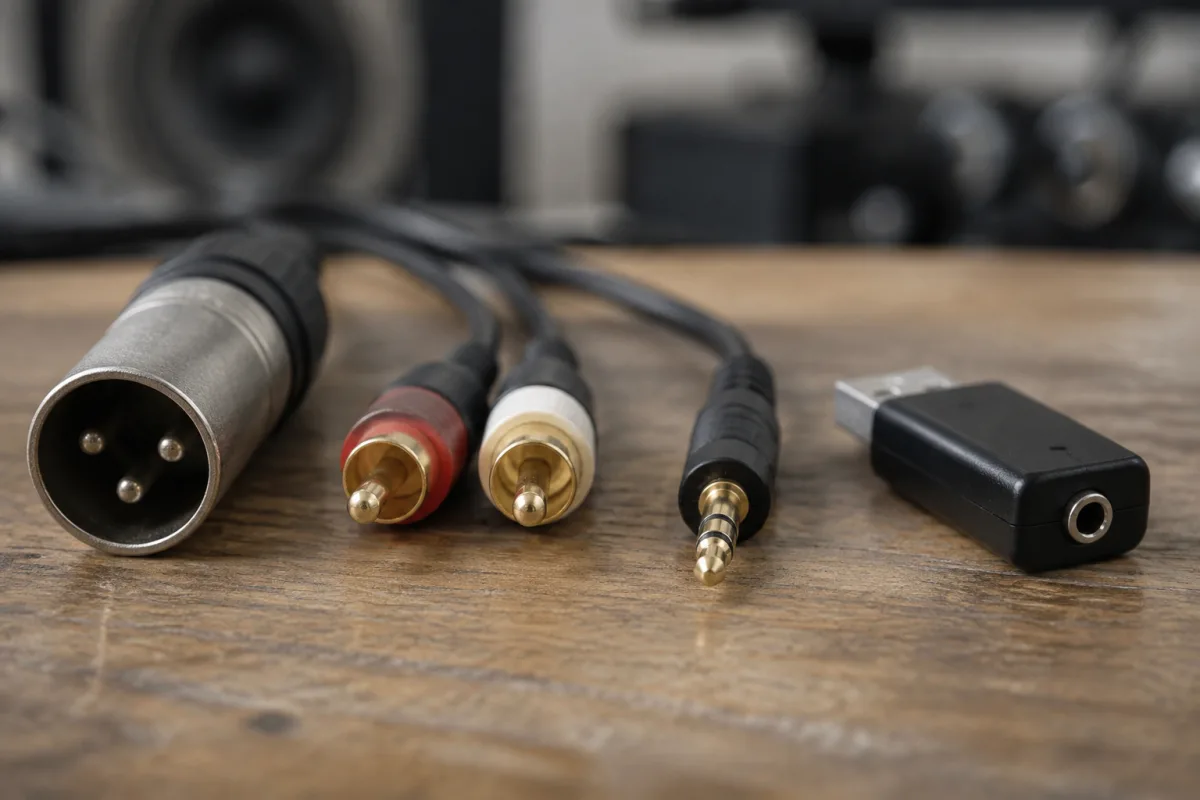
When you're setting up a home studio or connecting audio equipment for the first time, you quickly discover that not everything plugs together directly. Your microphone has an XLR connector, but your audio interface might expect USB. Your headphones have a 3.5mm jack, but the only available output is RCA. You need an audio plug converter. If you've ever stared at different cables, confused about which converter you actually need, whether cheap adapters work, or whether you're making things worse instead of better, this guide is for you. Audio plug converters are genuinely simple—you just need to understand which types exist, when you actually need one, and which converters are worth buying versus which ones you should avoid.
Why Audio Plug Converters Matter for Beginners
Not every audio device uses the same connector type. Designers over decades created numerous standards, each with advantages for different applications. Microphones typically use XLR (professional standard). Consumer headphones use 3.5mm jack. Older audio equipment uses RCA. USB is now common for digital audio. This diversity means incompatibilities are normal and frustrating. Audio plug converters solve this by bridging different connector types, letting you connect equipment that wouldn't otherwise work together. Understanding converters saves you from buying duplicate equipment, keeps your setup flexible, and eliminates the stress of "this doesn't plug in anywhere."
Importantly, converters aren't cheating or compromising—they're essential parts of modern audio. Every professional studio uses converters. Don't feel bad about needing them.
Common Audio Connector Types
Here are the types you'll encounter most frequently:
- XLR (3-pin or 5-pin): Professional audio standard. Microphone inputs, balanced line signals, high-quality audio equipment. Standard for recording studios.
- 3.5mm jack (mini jack): Consumer headphone and portable device standard. Lightweight, compact, affordable. Your phone uses this.
- RCA (Phono): Older consumer audio standard. Two connectors per channel (red/white or red/black). Found on older amplifiers, turntables, and legacy equipment.
- USB: Digital audio standard for computers and modern devices. USB-A (large), USB-B (square), USB-C (small). Not true analog audio; converts to digital.
- 1/4 inch jack (TS/TRS): Professional instrument audio standard. Guitar amplifiers, keyboards, line-level signals. Larger than 3.5mm.
- Optical/TOSLINK: Digital audio only. Carries audio as light pulses through fiber-optic cable. Higher quality than coaxial digital but more fragile.
- Coaxial digital: Digital audio using RCA connector. Looks like standard RCA but carries digital signal. Common on older CD players and receivers.
Most beginners need converters between XLR/3.5mm, XLR/1/4 inch, or RCA/3.5mm. These are the bottlenecks where equipment doesn't match.
When You Actually Need Converters
You need a converter when:
- Your microphone (XLR) doesn't plug into your audio interface (USB)
- Your headphones (3.5mm) don't plug into your amplifier (RCA)
- Your synthesizer (1/4 inch jack) doesn't connect to your mixer (XLR)
- Your older turntable (RCA) won't reach your modern receiver (USB or digital)
You don't always need a converter. If you buy equipment that matches connectors by design, converters are unnecessary. However, as studios grow, equipment from different eras inevitably mixes, creating mismatches.
Types of Audio Converters
Passive converters: Simple mechanical adapters that change connector shape only. No electronics involved. Cost £2–£10. Suitable for analog audio only. Examples: 3.5mm to RCA, XLR to 1/4 inch. Excellent value, genuinely work fine.
Active converters: Include electronics that convert signal types. More expensive, £20–£80+. Required for digital to analog (e.g., coaxial digital to analog RCA). Necessary when connector types are fundamentally incompatible signal types.
Adapters: Extremely cheap connector adapters (£0.50–£2) that change gender (XLR male to XLR female) without changing signal. Useful for temporary connections but sometimes introduce intermittent issues from loose connections.
Professional converters: High-quality equipment in professional studios, often expensive (£100–£500). Include signal conditioning, balanced/unbalanced conversion, and premium components. Overkill for beginners but available if needed.
For most beginners, passive converters (£2–£15) solve 90% of connection problems. Only buy active converters when connecting fundamentally different signal types (digital to analog).
Budget-Friendly Approach
Start by identifying your specific connectivity problem. If you need XLR female to 3.5mm male, buy that specific passive converter (usually £3–£8). Don't buy a variety pack of adapters "just in case"—you'll waste money on things you never use. Buy converters as needed, starting with the most budget-friendly passive options, upgrading to active only if passive doesn't work.
Quality matters slightly more than price for converters. A £0.50 adapter might work perfectly, but a £5 version with better internal contacts often prevents intermittent connection issues. Spend £5–£10 per converter, not £0.50, and you'll have better reliability.
Common Beginner Mistakes
Mistake 1: Assuming cheap adapters are perfectly reliable. Ultra-cheap adapters (under £1) have loose internal connections that sometimes fail intermittently. Spend £5–£10 per converter and avoid frustration.
Mistake 2: Not verifying connector types before buying. Write down exactly what connectors you need to connect. "Microphone to interface" is vague; "XLR female to USB type B" is clear. Bring photos or cables to the shop to verify.
Mistake 3: Buying active converters when passive would work. Passive converters are cheaper and simpler. Only upgrade to active when signal types genuinely require conversion (digital to analog, balanced to unbalanced).
Mistake 4: Using consumer converters in professional settings. Low-quality adapters introduce noise and signal loss. For recording studios, invest in professional-grade converters from trusted brands. The improvement is noticeable.
Mistake 5: Assuming a converter will fix audio quality issues. Converters preserve audio quality if they're good quality themselves. Poor-sounding audio usually means poor-quality source equipment or bad setup, not the converter's fault.
Mistake 6: Stacking multiple converters to solve connection problems. If your microphone doesn't connect to your interface, don't try XLR to 1/4 inch, then 1/4 inch to USB. Each conversion introduces potential problems. Buy equipment with matching connectors or a converter that directly solves the problem.
Testing Your Converter
Once installed, test your converter with audio playing through it. You should hear no buzzing, hum, or crackling. If you do, the converter isn't working correctly—either the connector is loose, the converter is faulty, or you need an active converter instead of a passive one. Don't accept intermittent problems; get a replacement immediately.
Building Your Audio Setup Confidence
Audio converters are not complicated or mysterious. They're practical tools that solve real compatibility problems. Start simple: understand your specific connectivity needs, buy the exact converter required, test it, and move on. As your setup grows, you'll learn which converters you reach for repeatedly and stock spares accordingly. But beginners should buy only what they immediately need, not preemptively stock every possible converter type.
Moving Forward With Your Audio Setup
Audio plug converters are essential parts of any growing home studio. They're affordable, straightforward to use, and genuinely solve connection problems. Invest in mid-quality converters (£5–£15 each) rather than ultra-cheap options, and you'll enjoy reliable audio without frustration. For a deeper dive into audio connector standards, professional signal chain building, and advanced conversion needs, read our complete guide to audio plug converters.
Right now, identify your specific connectivity problem, buy the right converter, and enjoy having your audio equipment finally work together seamlessly.


Comments