


USB Interfaces article
A Guide to Sound Interface Usb
A USB interface connects your synthesizer or keyboard to your computer, handling audio conversion and providing low-latency monitoring that makes modern keyboard recording genuinely musical.
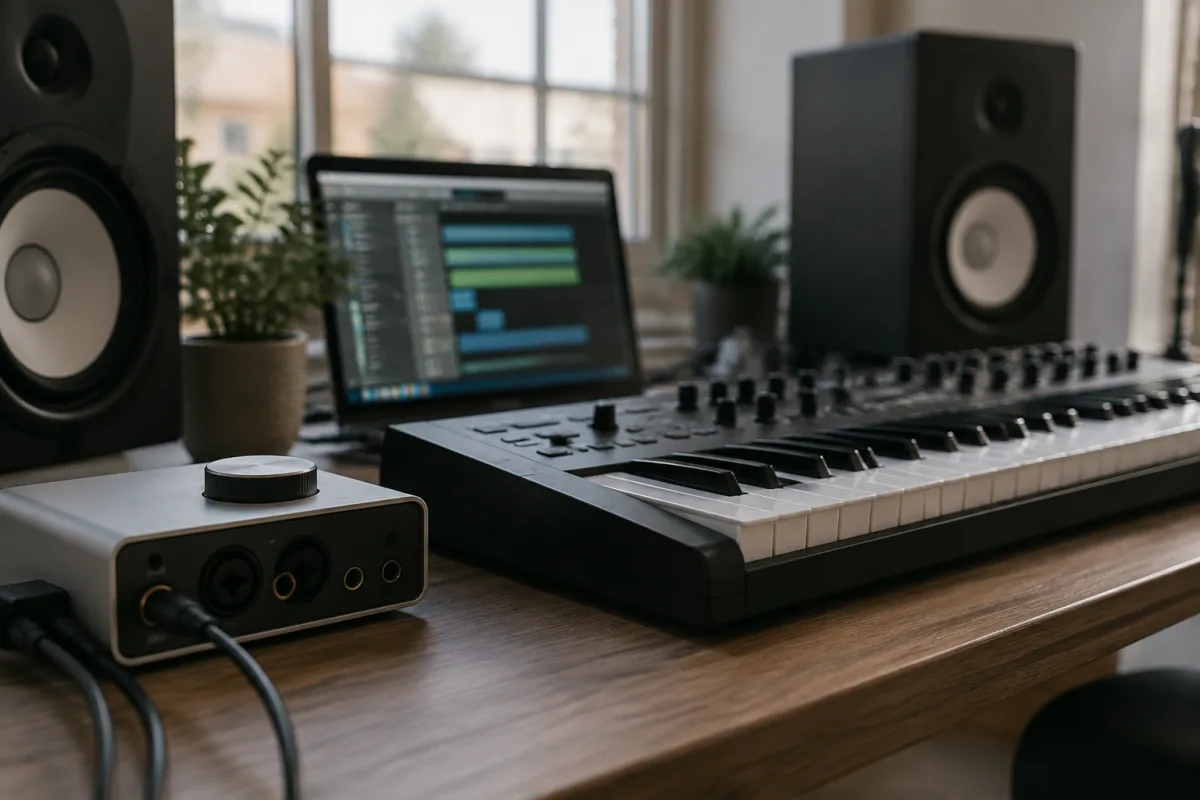
If you own a synthesizer or digital keyboard and want to record or perform with a computer, a USB interface is your essential bridge between two worlds. These unassuming boxes handle the conversion between your keyboard's audio outputs and your computer's inputs, whilst also providing low-latency monitoring and MIDI connectivity that makes modern keyboard music-making genuinely possible. Without a USB interface, you're tethered to analogue connections, compromised latency, and the complexity of managing separate cables. With one, your entire setup becomes fluid, integrated, and far more creative.
What Exactly Is a USB Interface for Keyboards?
A USB interface is an audio I/O device that connects your keyboard or synthesizer to your computer via USB. It handles conversion between the analogue signals your keyboard produces and the digital data your computer understands and vice versa. But a USB interface is far more than a simple cable adapter. It includes audio converters, preamps, monitoring controls, often phantom power for condenser microphones, and increasingly, MIDI I/O built right in. For keyboard players, the USB interface has become the central hub of the studio setup—everything connects through it.
Modern synthesizers and digital keyboards output line-level audio, which is too hot for a computer's standard microphone input. A USB interface reduces that level appropriately and gives you proper monitoring capabilities. Most importantly, it provides the low-latency monitoring that turns recording from a frustrating guessing game into something genuinely musical. You hear yourself in real time, at virtually zero delay, which means you can perform naturally and respond to your own playing.
USB Interfaces vs. Traditional Keyboard Connections
Many synthesizers and keyboards include USB connections directly, and that might make you wonder why you'd need a separate USB interface. The truth is nuanced. A keyboard with USB audio output may work fine for basic recording, but direct USB connections often introduce higher latency—the slight delay between playing a note and hearing it back. For keyboards and synthesizers where responsiveness matters, especially if you're layering synthesizer sounds or playing along with backing tracks, that latency becomes genuinely frustrating. A dedicated USB interface typically offers lower latency, better monitoring options, and superior audio quality. It's a separate piece of kit, yes, but it transforms how your keyboard connects to a computer from a convenience into a proper workflow.
Key Specs: What Matters for Keyboard Recording
Audio quality for keyboard recording centres on a few core specifications that separate capable USB interfaces from basic ones. Sample rate and bit depth determine fidelity—48 kHz and 24-bit is the industry standard and more than sufficient for keyboard recording. Lower sample rates (44.1 kHz) are fine but less flexible if you ever need to export for film work. Bit depth of 16-bit suffices, but 24-bit gives headroom during mixing and is now standard on even budget USB interfaces.
Latency is the hidden killer. Measured in milliseconds, round-trip latency below 5 ms feels real-time to most keyboard players. USB 2.0 interfaces typically achieve 2–4 ms latency with proper driver setup, which is perfectly usable. USB 3.0 interfaces can go lower still. If your USB interface offers buffer size control, experiment between 64 and 256 samples to find your comfort zone—smaller buffers mean lower latency but higher CPU load and risk of glitches.
Channel count matters depending on your keyboard setup. A simple two-in/two-out USB interface suffices if you're recording a single synthesizer or keyboard. If you plan to record multiple keyboards simultaneously, or add microphones and instruments, you'll want at least four inputs. Professional USB interfaces go up to sixteen, twenty-four channels or more, but for most keyboard players, four to eight inputs and two outputs prove perfectly adequate.
MIDI and Your Keyboard Workflow
MIDI connectivity has become integral to USB interfaces. Most modern interfaces include MIDI in and out via USB, meaning you can send MIDI data from your keyboard to your computer, record it, edit it, and control other instruments or software. For synth players who layer multiple synthesizers or use software instruments alongside hardware, MIDI integration transforms your setup. You're no longer juggling separate USB cables and adapters—everything flows through one USB interface to your computer.
Some USB interfaces include USB MIDI hubs that let you connect multiple keyboards and controllers to a single interface, creating a unified control centre. This matters when you're building an integrated synthesizer rig where everything talks to everything else. The keyboard sends performance data, receives MIDI clock, and stays perfectly in sync with your digital audio workstation.
USB Audio and Your Synthesizer's Output
Most synthesizers and keyboards output audio via stereo jack connectors—usually quarter-inch (6.35 mm) or RCA connectors. Your USB interface needs inputs that match your keyboard's outputs. If your synthesizer outputs balanced XLR (professional studio level), you'll want a USB interface with XLR inputs. If it outputs unbalanced RCA or quarter-inch jack, look for interfaces with line inputs on those formats. Balanced inputs reject interference better, which matters in noisy environments, but unbalanced works fine for short cable runs.
The advantage of a USB interface is that you can connect multiple synthesizers and keyboards simultaneously. Run one synthesizer to channels 1 and 2, another to channels 3 and 4. Record them separately, mix them individually, or combine them. That flexibility transforms a USB interface from a simple recording tool into a proper mixing desk for your keyboard arsenal.
Monitoring and Playback
Direct monitoring—hearing your synthesizer's output in real time with no computer latency—is a game-changer. Your USB interface has a monitor knob that lets you balance between hearing your keyboard's direct signal and your computer's playback. Most interfaces let you route different inputs to different monitor outputs, so you might hear your synthesizer on one output while monitoring your digital audio workstation mix on another output. This level of control simply isn't available from a keyboard's direct USB connection.
Headphone outputs on your USB interface let you hear everything privately whilst recording or rehearsing. Many interfaces offer separate headphone mixes—you might hear your keyboard plus effects in your headphones whilst the recording captures only the dry synthesizer signal. That flexibility is invaluable for layered keyboard work.
Setup and Getting Started
Connection is straightforward—USB cable from the interface to your computer, audio cables from your synthesizer to the interface, and you're ready. Install the driver software from your interface's manufacturer—these days, most modern USB interfaces work with plug-and-play drivers on Mac and Windows, though downloading the latest driver from the manufacturer ensures you get the best performance and bug fixes.
In your digital audio workstation, set the input and output device to your USB interface. Create new audio tracks, arm them for recording, and monitor your synthesizer. Start with a buffer size of 256 samples to ensure stability, then experiment downward if you experience latency. Many keyboard players find their sweet spot somewhere between 128 and 256 samples, balancing responsiveness against CPU load.
Choosing the Right USB Interface for Your Setup
Budget USB interfaces—under £100—offer basic two-in/two-out connectivity and sufficient audio quality for learning and home recording. Expect solid build quality from reputable brands like Behringer or PreSonus, though cheaper options sometimes cut corners. Mid-range USB interfaces (£100–£250) add better preamps, lower latency, improved monitoring options, and often include MIDI. Premium USB interfaces (£250+) offer superior converters, more channels, professional build quality, and exceptional latency performance.
Your actual needs determine the right choice. A simple keyboard recording setup doesn't need premium specs. A working synthesizer rig where multiple keyboards feed a USB interface demands reliability, low latency, and enough channels. Consider future expansion—a four-input interface costs little more than a two-input one and gives you room to grow.
Compatibility matters. Check that your USB interface works with your operating system and digital audio workstation. Older interfaces may lack modern drivers for current Mac and Windows versions. Newer interfaces are universally compatible, and most brands provide driver support for years. If you plan to use your interface across different computers or operating systems, verify compatibility before purchasing.
USB Interfaces and Live Performance
Beyond the studio, a USB interface opens possibilities for live keyboard performance with backing tracks and effects. Connect your synthesizer to the interface, run your digital audio workstation on a laptop, and suddenly you can trigger samples, run effects plugins on your keyboard sound, and layer your synthesizer performance with pre-recorded arrangements. Many keyboard players now use a USB interface and laptop as part of their live rig—it's become an instrument in itself, not just a recording device.
USB powered interfaces—which draw power from the USB connection rather than needing an external power supply—make this genuinely portable. You can play a gig with nothing but your synthesizer, a USB interface, a laptop, and headphones. That simplicity has transformed keyboard performance from a stationary studio activity into something genuinely mobile and flexible.
The Bottom Line
A USB interface transforms your synthesizer or keyboard from an isolated instrument into an integrated part of a computer-based music setup. It handles audio conversion cleanly, provides essential monitoring capabilities, integrates MIDI seamlessly, and offers the low-latency performance that makes modern keyboard recording and performance genuinely musical. Whether you're recording demos at home, building a live rig, or integrating multiple synthesizers into a unified system, a USB interface isn't optional—it's the central hub that makes it all work. Get a decent one, set it up properly, and you'll wonder how you ever managed without it.
Frequently Asked Questions
What is the difference between a USB interface and a keyboard's built-in USB output?
A dedicated USB interface typically offers lower latency, better monitoring controls, and more flexible audio routing than a keyboard's direct USB connection. Many keyboards' USB outputs prioritise convenience over performance, which can result in noticeable latency that makes real-time playing feel delayed. A proper USB interface removes that frustration and gives you genuine monitoring options.
How much latency is acceptable for keyboard recording?
Below 5 milliseconds round-trip latency feels real-time to most keyboard players. Below 2 milliseconds is excellent. Anything above 10 ms becomes genuinely noticeable and frustrating. Modern USB interfaces consistently achieve the 2–5 ms range with proper driver setup and buffer management.
Do I need a USB interface with MIDI, or can I connect my keyboard's MIDI separately?
Built-in MIDI on a USB interface is convenient and reduces cable clutter. You can also use separate MIDI cables and interfaces, which some people prefer for flexibility. For most setup, built-in MIDI on the USB interface simplifies everything—everything connects through one cable to your computer.
How many inputs do I actually need on a USB interface?
Two inputs suffice for recording a single synthesizer or keyboard. Four inputs give you room to record two keyboards simultaneously or add a microphone. Eight or more inputs make sense if you plan a larger synthesizer rig with multiple keyboards and instruments. Start with what you need now and choose an interface that leaves room for modest future expansion.
Can I use a USB interface with an older keyboard that only has analogue outputs?
Absolutely. Connect the keyboard's audio outputs (typically RCA or quarter-inch jack) to the USB interface's audio inputs. The interface handles the rest. USB interfaces work with any audio source that outputs standard line or instrument level—old synthesizers, modern keyboards, everything.
What's the best way to reduce latency on my USB interface?
Use the latest drivers from your interface manufacturer. Lower the buffer size—try 128 samples first, then 64 if your computer handles it. Disable unnecessary software running in the background. Direct monitoring on the interface itself eliminates latency entirely for hearing your synthesizer. Some people use a combination of smaller buffer sizes and direct monitoring to achieve imperceptible latency.





Comments