


Mpc Akai 2000 Xl Buying guide
Mpc Akai 2000 Xl: A Complete Buyer's Guide
Shopping for a used Akai MPC2000XL? This guide covers price tiers, essential checks (pads, display, buttons), common problems, and what to verify before committing.
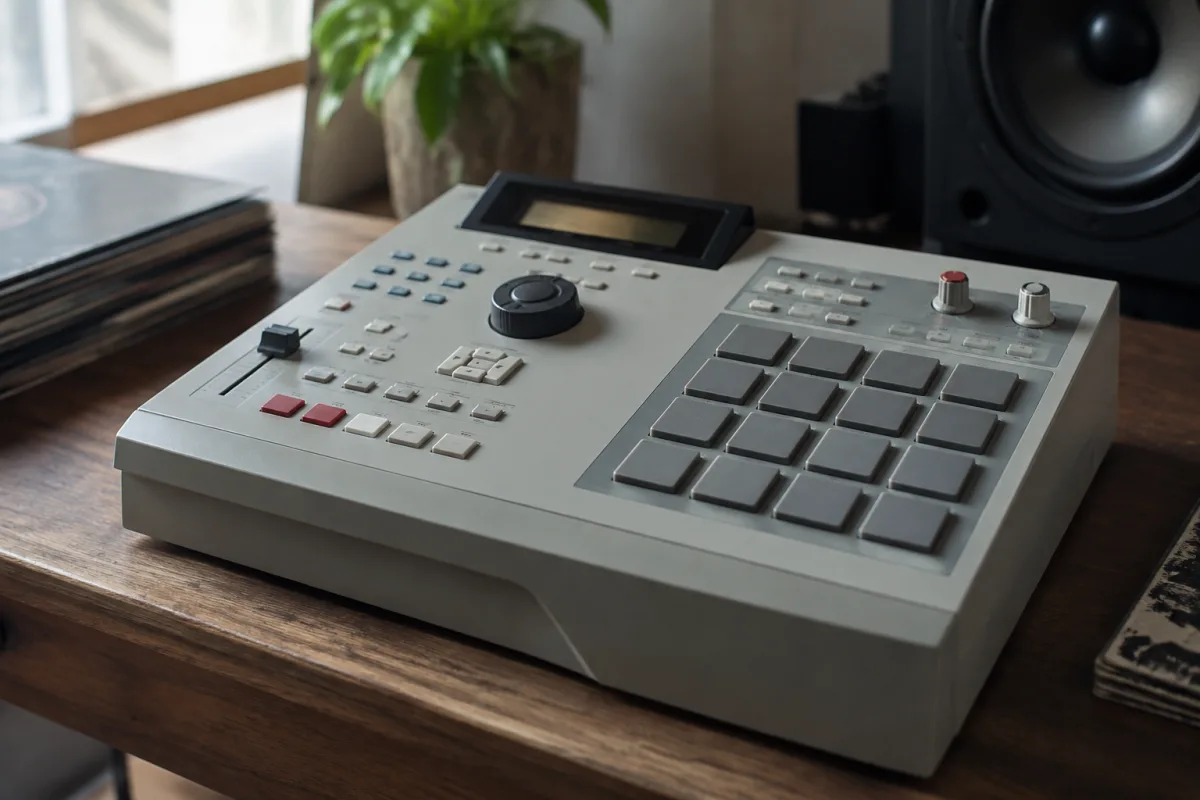
The Akai MPC2000XL is legendary in hip-hop production and beat-making. Used by professionals from Timbaland to smaller bedroom producers, it's a workhorse that holds its value and sounds excellent. But if you're considering buying a used MPC2000XL (most are), you need to know what to inspect and what specs matter so you don't buy a faulty unit that frustrates you. This buyer's guide walks you through price expectations, essential checks, common problems to avoid, and tips for finding a good example.
Understanding MPC2000XL Market Prices
Budget (£150–£250)
Units in this range are older, often heavily used, and may have cosmetic wear or minor issues. The display might show dust under the screen; buttons might feel slightly loose. These work if you don't mind imperfection and are comfortable with basic troubleshooting. However, be cautious about units with yellowed plastic or stiff pads—these indicate age and potential internal wear.
Mid-Range (£250–£400)
Most well-maintained, clean MPC2000XL units fall here. They've been used but cared for, with minimal cosmetic wear and fully functional pads and buttons. This is the sweet spot for value: you get a reliable, playable unit without overpaying for near-mint condition. Most professional users start searching in this range.
Premium (£400+)
Near-mint or newly serviced units command premium prices. These have been reconditioned, feature replaced pads, fresh cases, or are barely used. If you need absolute reliability and pristine aesthetics, this tier is worth it. Many sellers advertise "recently serviced" or "new pads"—verify these claims with proof (receipts, photos of work done).
Essential Specs and Hardware to Verify
Pad Condition
The sixteen velocity-sensitive pads are the heart of the MPC2000XL. With age, pads lose responsiveness or become intermittently unresponsive. Press each of the sixteen pads firmly multiple times. Each should register immediately and consistently. If any pad feels soft, mushy, or requires extra pressure to register, it's worn. Replacement pads exist but cost money and time to install. Budget £30–£60 for professional pad replacement if needed.
Display and Screen
The LCD screen should display text clearly and without dead pixels or lines. Look for dust or moisture under the screen—this indicates poor storage or potential internal damage. Turn the unit on and navigate menus to ensure the display responds quickly and shows all characters clearly.
Buttons and Knobs
All buttons should click crisply and respond immediately. Avoid units where buttons feel soft or unresponsive. The jog wheel (the rotary control) should turn smoothly and click into positions without grinding noise. Knobs should turn freely and smoothly. Stiff or grinding movement suggests dust or internal wear.
USB Connectivity
The MPC2000XL uses USB for data transfer and updating. Test the USB port by connecting to a laptop (bring one if buying in person). Transfers should be fast and reliable. If connection is intermittent or unstable, the port may be damaged or the internal connector loose.
Power and Battery Backup
Turn on the unit and let it run for 15 minutes. It should boot quickly (within 5 seconds) and stay powered without restarting. Check whether the internal battery (which backs up settings) is working by turning off the unit and then back on. The date and time should be preserved. A dead backup battery isn't critical but suggests the unit is old.
Audio I/O and Connections
Inspect all audio jacks (outputs, audio in, headphone out) for corrosion or loose fitting. Use a cable to test connections—audio should transfer cleanly without crackling or intermittent dropouts. Headphone output should be loud and clean.
Software and Memory to Check
OS Version
The latest stable OS version is 2.2.2. Ask the seller which version is installed. Earlier versions can have bugs. When you power on the unit, note the OS version displayed. If it's significantly older (1.x), budget £50–£100 for professional OS upgrade if you need the latest features.
Internal Memory
The MPC2000XL ships with standard internal memory (typically 16MB or 32MB depending on model). This is fine for most use. However, test whether the unit can save and load songs without crashing. Save a simple 8-bar beat, power off, power back on, and load it. Reliable operation suggests the memory is healthy.
Beat and Sound Library
Ask whether the unit includes the original factory sounds and beats. It should ship with standard MPC sounds (not customised libraries). If the unit has been heavily customised or third-party sounds installed, ask whether the original sounds are intact. You can restore them via USB if needed, but originality is a small plus for resale.
Common Pitfalls When Buying MPC2000XL
Not Testing Pads Thoroughly
Many sellers will demonstrate that pads work without you testing thoroughly. Spend five minutes tapping every pad multiple times. Press hard, press soft, hit them in rapid succession. If any pad is intermittent or requires extra pressure, factor pad replacement into your budget or negotiate the price lower.
Assuming "Barely Used" Is Always Better
A heavily used but well-maintained MPC2000XL is often more reliable than one that sat unused for years. Units stored in damp environments or extreme temperatures degrade internally. A unit that was gigged regularly and properly maintained often plays better than a "barely used" unit from a basement or attic.
Ignoring Signs of Water Damage
Check the interior around the circuit board for white crystalline deposits (corrosion) or visible water damage. Don't buy units with obvious corrosion—internal electronics are damaged. Also check whether any keys or buttons stick from water exposure.
Not Verifying the Power Supply
Original Akai power supplies are crucial. Third-party or modified power supplies can damage the unit. When buying, ask for the original power supply (a heavy, transformer-type adapter). Avoid buying units with aftermarket power supplies unless the price reflects the need to purchase a replacement original supply (£40–£60).
Overlooking the Case or Cables
Many sellers include a padded case and USB cable. If yours doesn't, budget £30–£50 for a decent protective case and £10–£15 for USB cables. These aren't critical but protect your investment during transport.
MPC2000XL Buying Checklist
- All sixteen pads respond immediately and consistently
- Display shows text clearly with no dead pixels
- All buttons and knobs work crisply and smoothly
- No grinding sounds from the jog wheel
- USB connection is stable and fast
- Unit boots quickly and runs stably for extended periods
- Audio output is clean and free of crackling
- Original power supply included
- No visible corrosion or water damage
- Backup battery works (date/time preserved after power-off)
Conclusion: Finding Your MPC2000XL
The Akai MPC2000XL is a reliable, inspiring beat-making machine when you buy a good example. Focus on pad condition and overall responsiveness—these are the first things to wear. Test everything in person if possible, and don't hesitate to ask the seller for proof of recent servicing or replacement pads. For deeper technical information about the MPC2000XL's features and workflow, read the complete guide to the Akai MPC2000XL. With these guidelines, you'll find an MPC2000XL that produces beats for years to come.



Comments