


Passive Direct Box article
Passive Direct Box for Beginners: A Complete Guide
A passive direct box is a simple tool every beginner bassist should master. This guide explains how to connect and use one, plus the common mistakes that trip up beginners.
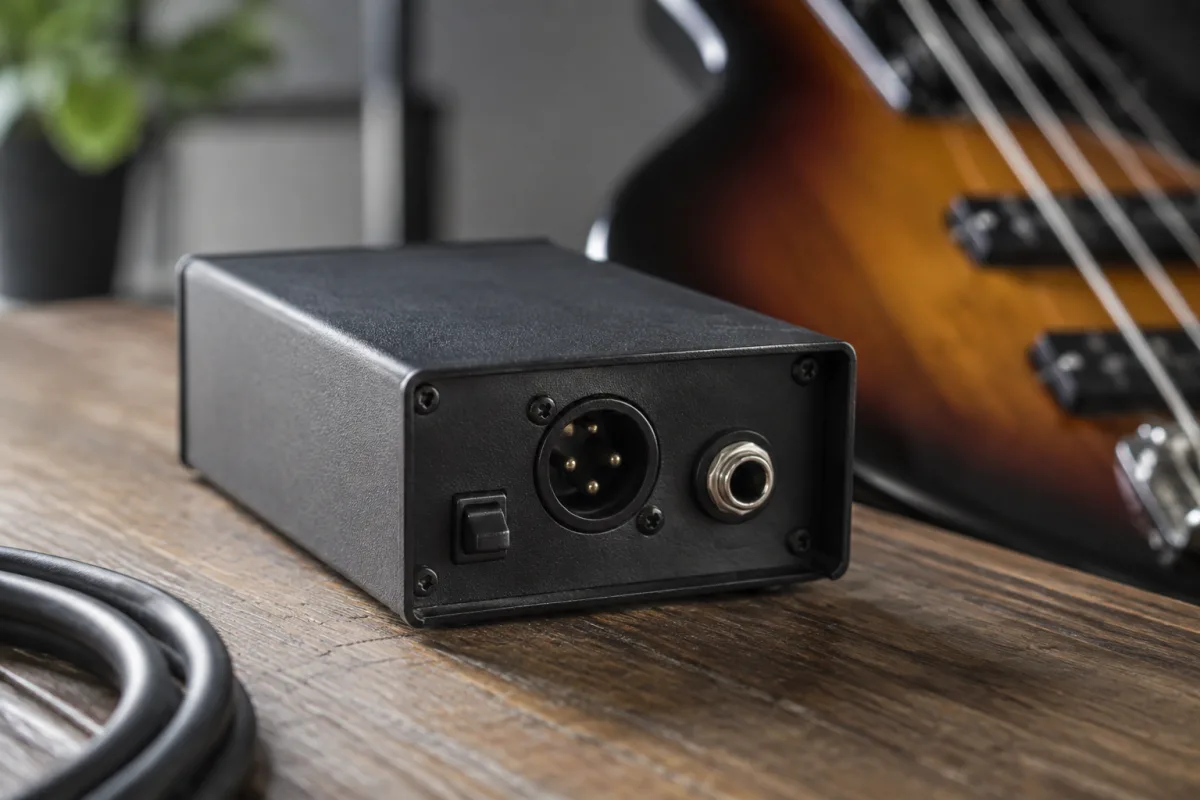
If you've just picked up a bass guitar, you might wonder why your rehearsal space or recording setup insists you use a direct box. Don't worry — it's far simpler than it sounds, and mastering this essential tool is a rite of passage for any bassist. This guide strips away the jargon and shows you exactly how it works and why every beginner bassist benefits from understanding the basics.
What Is a Passive Direct Box, Really?
A passive direct box — often called a DI box or simply a "DI" — is a small box that sits between your bass guitar and the mixer or audio interface. Its job is humble but essential: it takes the signal from your instrument and converts it into something the mixing console can handle properly.
Your bass outputs a "high-impedance" signal — think of it as a whisper in a crowded room. A mixing console expects a "low-impedance" signal — a shout. This passive device is the translator. Plug your bass into the input jack, run an XLR cable from the output to your mixer, and you're done. The box handles the conversation between them automatically, with no batteries required.
When Do You Actually Need One?
You'll need a direct box whenever your bass must connect directly to a mixing console, audio interface, or PA system — rather than going through an amplifier. Common scenarios for beginners include:
- Recording at home: Plugging your bass straight into your computer's audio interface or mixing board.
- Band rehearsals: Feeding your signal into the rehearsal room's house mixer for monitoring.
- Live gigs: Giving the FOH (front-of-house) engineer a clean signal direct from your bass alongside your amp.
- Collaborations: Jamming with musicians online or in studio where everyone's feeding a mixer.
If you're playing through a bass amplifier and nothing else, you may not need one immediately — but learning to use this tool opens doors.
Basic Setup: Three Simple Steps
Using one for the first time is genuinely easy. Follow this straightforward path:
- Connect your bass to the input. Plug your bass cable into the 1/4-inch input jack on the box. It's usually marked "IN" and looks exactly like a guitar cable jack.
- Run an XLR cable from the output. Take a standard XLR microphone cable from the "OUT" XLR socket straight to an available XLR input on your mixer or audio interface. This is the "low-impedance" connection the mixer expects.
- Set a level. On your mixer, start with the channel fader at about -6dB and play a note. Adjust the input gain until you see a healthy signal on the meter — ideally bouncing around -12dB to -6dB, with peaks near 0dB but not clipping. You've got it dialled in.
That's it. Once the levels are set, the device requires zero further fiddling.
Why Passive, Not Active?
You might bump into "active" direct boxes, which include a built-in amplifier and require a battery or phantom power. For a beginner, a passive model is the right choice. It's cheaper, needs no batteries, and works reliably with any mixer. Active versions offer extra features (like level control) that aren't essential when you're learning. Master the passive type first; upgrade if you need to later.
Common Beginner Mistakes to Avoid
Even though using a passive direct box is straightforward, beginners often stumble in the same ways. Watch out for these:
Forgetting to use one at all
Some beginners plug their bass straight into a mixer's instrument input. The impedance mismatch means the signal sounds thin, brittle, or distorted. Always use this tool between your bass and any professional console. It costs £15–40 and transforms your tone.
Running the cable too long
A long 1/4-inch cable from your bass to the DI box can pick up noise. Keep that distance short — no more than 3–5 metres — and use a shielded cable. The XLR cable from the DI to the mixer can be as long as you need; XLR is designed for distance.
Mismatching cable types
The input side (bass to DI) uses a 1/4-inch phone jack. The output side (DI to mixer) uses XLR. If you're unsure which cable is which, ask; it's a quick conversation. Both cable types are inexpensive and universally available.
Cranking the level wrong
If you set the channel fader too hot (too loud), you'll clip the input and get a distorted, unusable signal. If it's too quiet, you'll have to turn up the fader later, which amplifies noise. Set the level at the input gain knob first, with the fader at a moderate level (around -6dB or -10dB). You're aiming for steady peaks near 0dB, not slamming it.
Assuming phantom power applies
Passive DI boxes don't use phantom power — they don't need it. If you see a "phantom power" switch on your mixer and your passive DI connected, it won't hurt anything, but it doesn't do anything either. Leave it off unless you're using a microphone or active DI that requires it.
Troubleshooting: What If It Doesn't Work?
If you've connected the device and hear nothing, check these in order:
- Is your bass plugged in firmly? Wiggle the cable at both ends.
- Does the mixer channel have a fader that's pulled down? Raise it to unity (0dB).
- Is the input gain on the channel set too low? Slowly turn it up while playing, watching the meter.
- Are you muted? Check for a mute button on the mixer channel or master.
- Is XLR cable fully seated in the mixer input? XLR connectors lock with a twist; make sure it's clicked in.
If you still have no signal, you've likely found a faulty cable (replace it) or a broken DI box (rare, but it happens). Try a different XLR cable first; that solves most problems.
Next Steps for Confidence
Now that you understand the basics of using this device, practice in your rehearsal space. Get comfortable plugging in and out, setting levels, and walking away knowing your signal is clean. Once it's routine, you can focus on playing instead of worrying about the gear. A passive direct box is genuinely one of the easiest pieces of audio equipment to learn, and it's a skill that will serve you throughout your bass career.
Conclusion
A passive direct box is a simple, affordable tool that every beginner bassist should know how to use. Connect your bass, run an XLR cable to your mixer, set a healthy level, and you're done. It sounds intimidating until you've done it once; after that, it's second nature. Avoid the common beginner pitfalls — using the wrong cables, setting levels carelessly, or skipping it entirely — and you'll find that this device quickly becomes invisible in your workflow. Master this skill early, and you'll be ready for any rehearsal, recording session, or live gig that demands direct bass input.


Comments