


Roland System One article
Roland System One for Beginners: A Complete Guide
The Roland System-1 is one of the most approachable synthesisers for first-time electronic music producers. Discover how to get started with confidence, understand core controls, and create your first custom sound in this beginner's guide.
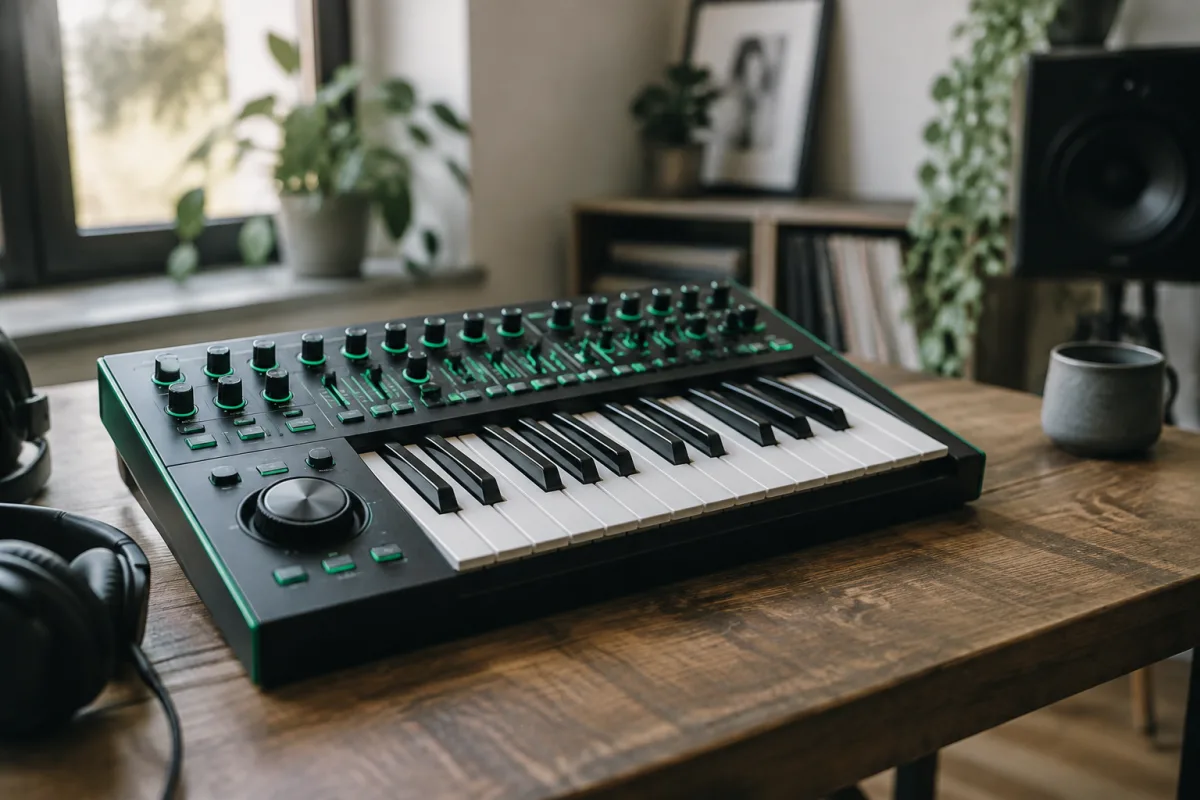
The Roland System-1 can feel intimidating at first glance, but it's actually one of the most approachable synthesizers for someone stepping into electronic production for the first time. Whether you've been curious about synthesis or ready to make your first electronic sounds, this guide will ease you through those crucial first steps without the overwhelming jargon that typically surrounds synthesisers.
Why the Roland System-1 Is Perfect for Beginners
The beauty of the System-1 lies in its philosophy: powerful sound design packed into an interface that doesn't require a degree in electrical engineering to understand. Unlike many synthesisers that sprawl across a desktop with hundreds of knobs, the System-1 keeps things focused. You get a keyboard with 25 keys—enough to learn proper finger placement and technique—without feeling cramped. The layout is intuitive, with controls grouped logically and clear labels beneath each knob.
Roland designed this synthesiser specifically for people like you: those willing to invest in learning but unwilling to drown in complexity. The sound quality is professional-grade despite the compact size, meaning you'll never outgrow it as your skills develop.
Getting Started: Your First Hour
When you unbox your System-1, you'll need a USB cable and a power supply (both included). Plug it in, connect it via USB to your computer, and download the latest firmware from Roland's website. This takes five minutes and ensures you have the newest sounds and features.
Before diving into sound design, simply play. Press keys and twist knobs. This is exactly what you should do. There's no wrong button to press—nothing will break. This exploratory phase teaches you how the synthesiser responds, builds your confidence, and removes the intimidation factor immediately. Spend 20 minutes just listening to what happens when you adjust parameters.
Understanding the Essential Controls
The System-1 simplifies synthesis down to four core areas:
- The Keyboard: Play notes here. Each white key is a natural note (C, D, E), each black key is a sharp or flat. The mod wheel on the left adds expression without changing the pitch.
- Oscillator Section: This generates the basic sound wave. For beginners, think of it like the instrument type—square waves sound hollow, sawtooth waves sound bright, sine waves sound pure and smooth.
- Filter Section: This shapes the tone by removing certain frequencies. Turn the cutoff knob and you'll hear the sound get brighter or darker. It's the most immediate way to make unique sounds.
- Envelope Section: This controls how sound evolves over time. Press a key and the sound either attacks instantly or swells gently. Release the key and it either cuts off abruptly or fades away. Master envelopes and you've unlocked 80% of synthesis.
Your First Preset: Building from Nothing
The System-1 ships with excellent presets, and you should absolutely load them and play along to get inspired. But creating a simple sound from scratch teaches you far more. Here's a straightforward exercise:
- Press the Osc Type button until "Sawtooth" displays
- Set the Filter Cutoff to about halfway
- Press a key and hold it—notice how the sound is sustained
- Slowly turn the Filter Cutoff knob left and right to hear the difference
- Find the Attack knob in the envelope section and turn it up. Now when you press a key, the sound fades in gently instead of attacking immediately
- Adjust Release so the sound takes a few seconds to fade after you let go
Congratulations—you've just created your first custom synthesiser sound. It probably sounds like a pad or a warm string sound. This fundamental exercise shows how oscillators, filters, and envelopes work together.
Connecting to Your Computer and Recording
The System-1 connects via USB to your DAW (Digital Audio Workstation)—software like Ableton, FL Studio, or even free options like GarageBand. When connected, your computer recognizes it as both a MIDI controller (you can play virtual instruments) and an audio device (you can record the actual System-1 sounds).
For your first week, focus on making sounds and playing them on the keyboard itself. Get comfortable with the controls. Then explore connecting it to your DAW when you feel ready. This prevents overwhelming yourself with too many new things at once.
Common First-Timer Mistakes to Avoid
Learning from others' stumbles accelerates your progress:
- Forgetting to save your custom sounds: Always press the Save button after creating something you like. Otherwise, you'll lose it when you switch presets.
- Ignoring the filter: Many beginners focus solely on the oscillator type. The filter is equally important—it's where subtle, professional sounds come from.
- Setting everything to maximum: It's tempting to max out all knobs thinking it'll sound better. Most excellent sounds use subtle, minimal movements. Restraint creates sophistication.
- Not using velocity sensitivity: The keyboard responds to how hard you press keys. Gentle presses make quiet sounds, hard presses make loud sounds. This dynamic control is essential for musical expression.
- Neglecting the learning resources: Roland includes a solid manual and free tutorial videos. They're genuinely worth watching in your first month.
Your Learning Path Forward
Week one: Play the presets and explore the controls without fear. Week two: Start creating simple sounds using the exercise above. Week three: Connect to your DAW and record your sounds into a track. By week four, you'll have genuinely surprising confidence.
For a deeper dive into how synthesis works across different instruments, our complete guide to the Roland System-1 explores advanced techniques and workflow integration in detail.
The System-1 is genuinely beginner-friendly whilst remaining deep enough that professionals still use it. You're not learning on a toy—you're learning on a proper tool. That combination of approachability and capability is what makes it the right first synthesiser for many producers.


Comments